

Hi everyone,
I’m currently setting up a time tracking system in SmartSuite and could use some advice on formula formatting.
The Setup: Our employees enter their start time, end time, and break (in minutes) via a bot. This data is then sent to SmartSuite using Make.com. The integration works perfectly.
The Problem: I am trying to calculate the actual working hours using a formula: [End Time] - [Start Time] - [Break]
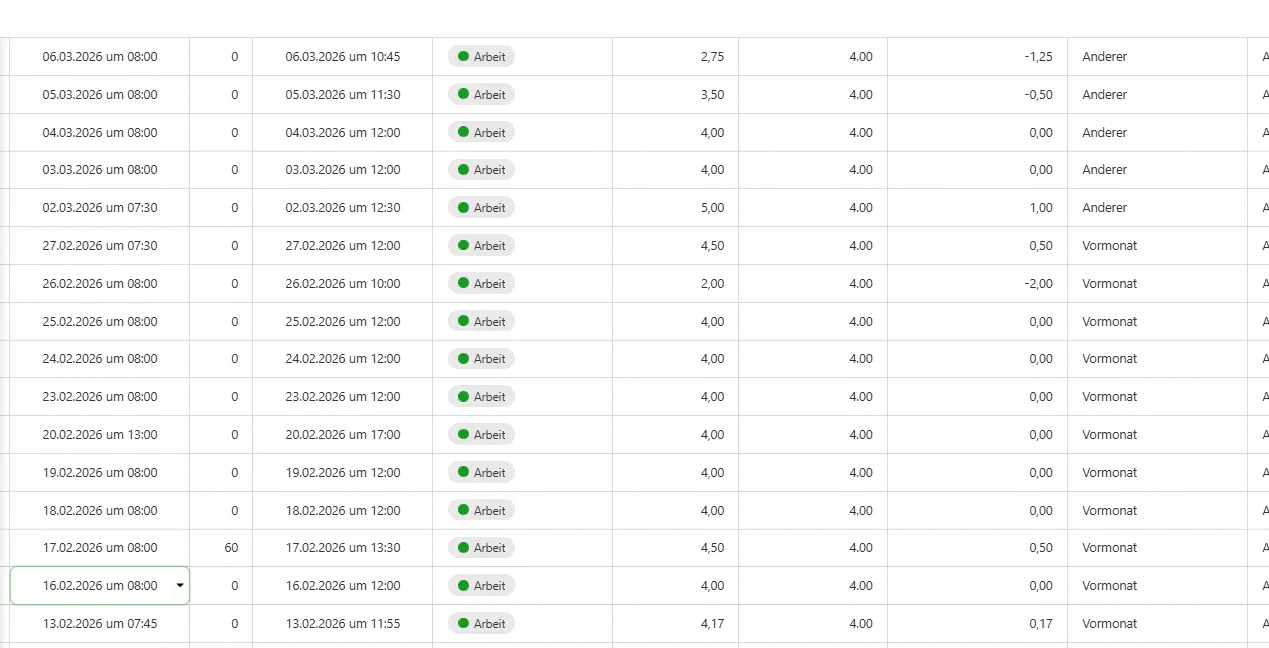
Currently, SmartSuite returns the result as a decimal value. For example:
30 minutes shows up as 0.50
15 minutes shows up as 0.25
2 hours and 45 minutes shows up as 2.75 (as seen in my screenshot)
My Goal: I would like the result to be displayed in a standard HH:MM format (e.g., 02:45 instead of 2.75) so it’s easier for our HR and employees to read at a glance.
Does anyone have a formula snippet or a specific field setting recommendation to convert these decimal durations into a "Hours:Minutes" string or time format?
Thanks in advance for your help!